
NEWS
Ulefone Omni Sentinel Puts Idle Armor Phones on Watch
Omni Sentinel recasts Armor infrared cameras and huge batteries as a local trail cam with no cloud plan, on 13 Ulefone phones.

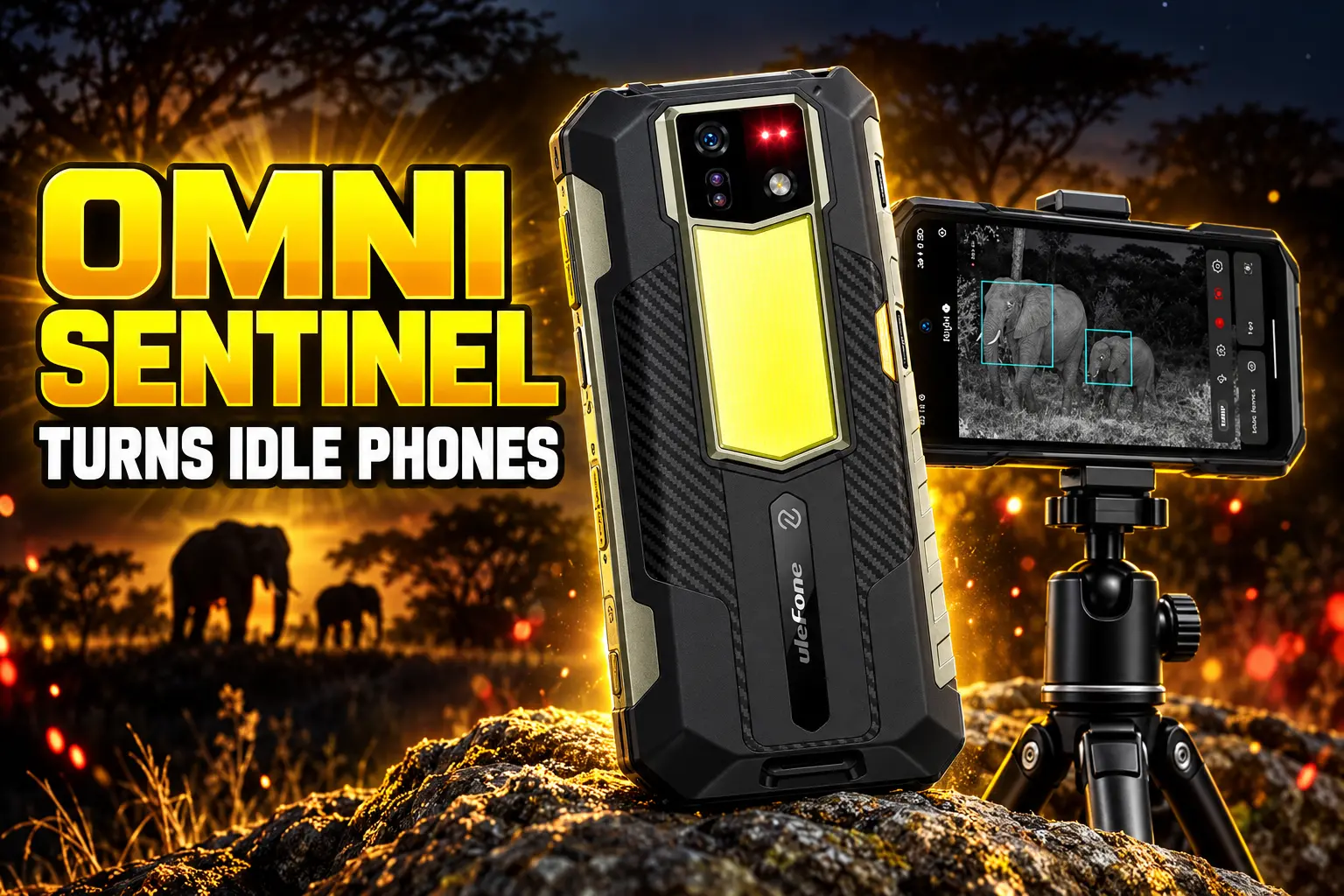
Ulefone has released Omni Sentinel, an on-device app that records people, vehicles, and animals on compatible Armor phones with no cloud plan. The software is already listed as available on 13 rugged models, with a longer wave marked coming soon.
The pitch is a trail cam you already paid for. The catch is that the clips, the live view, and the siren all live on the same handset you just left pointing at the dark.
Omni Sentinel Turns Idle Armor Phones Into Sentries
Ulefone’s page frames Omni Sentinel as a mobile trail cam and a security sentry for indoor and outdoor use, from wildlife and campsites to a garage, driveway, or yard. You set the phone to cover a patch of ground, preview the scene on the screen, and let on-device detection tag what moves.
The app identifies people, vehicles, and animals, then files those clips by category on a color-coded timeline. Sensitivity can be set high or low so wind, glare, and falling leaves trip fewer false alarms. A preset audio warning can play when something is flagged.
RECORDING MODES IN THE APP
- Manual: You start and stop a clip yourself from the on-screen controls.
- Scheduled: The phone records in windows you set in advance.
- AI-triggered: Detection of a person, vehicle, or animal starts the capture.
- Background: Recording can keep running while the handset sits in place.
Resolution steps through 720P, 1080P, 2K, and 4K, but only up to whatever that phone’s camera hardware already allows. Night mode switches to black-and-white monitoring and uses infrared lamps on models that have them. Ulefone says those lamps light the scene at wavelengths the eye does not see.
The Infrared Camera Was Already on the Back
The new piece is the app. The night hardware has been sitting on Armor phones for months, sold as a stills feature for job sites and trails, not as a parked sentry.
On September 14, 2026, Ulefone’s own account posted a photo of the Armor 24 Pro with the lamps lit and wrote, “See those red lights? That’s night vision at work.”
See those red lights? That’s night vision at work. 🌙
Equipped with a 64MP IR night vision camera and NightElf Ultra 2.0, the #UlefoneArmor24Pro reveals clear details even in complete darkness—ready for nighttime exploration, inspections, and more.Learn more:… pic.twitter.com/rJM1TWOeTy
— Ulefone Mobile (@UlefoneMobile) September 14, 2026
That module is a second rear sensor, not a thermal camera. Thermal reads heat. Night vision still makes a picture of the scene, with help from processing Ulefone brands as NightElf and, on several Armor models, from those infrared lamps.
HOW THE HARDWARE GOT HERE
- August 17, 2026: The Armor 22 Pro and Armor 24 Pro go on global sale with 64MP night-vision cameras already in the spec sheet.
- September 14, 2026: Ulefone shows the Armor 24 Pro’s infrared lamps as a darkness tool for exploration and inspections.
- September 20, 2026: A Ulefone explainer separates night-vision sensors from FLIR thermal modules on other Armor phones.
- October 2, 2026: Omni Sentinel ships as a system update on selected models, treating that same camera stack as a watch.
The Armor 22 Pro uses a 64MP OmniVision OV64B night-vision sensor beside a 64MP Sony IMX682 main camera. The Armor 24 Pro uses the closely related OV64B1B and NightElf Ultra 2.0. The Armor 30 pairs an OV64B with 4 infrared LEDs and NightElf 3.0. Omni Sentinel’s night mode needs that kind of infrared camera; phones without it still run the app in ordinary light.
A 22,000mAh Battery Changes the Overnight Watch
A trail cam is only useful if it lasts the night. Flagship phones dropped huge cells and microSD slots years ago. These Armor models kept both, which is why parking one as a camera is even thinkable.
THREE PHONES THAT ALREADY HAVE THE PARTS
| Model | Listed price | Battery and charge | Night vision | Local storage |
|---|---|---|---|---|
| Armor 22 Pro | $239.99 | 6,600mAh, 33W | 64MP OV64B | microSD up to 2TB |
| Armor 24 Pro | $359.99 | 22,000mAh, 66W, 130 min to full | 64MP OV64B1B | microSD up to 2TB |
| Armor 30 | $399.99 | 12,800mAh, 66W | 64MP OV64B, 4 IR LEDs | microSD up to 2TB |
The Armor 24 Pro’s 22,000mAh battery and 64MP night vision are the extreme case: Ulefone quotes up to 1,300 hours on standby and up to 100 hours of talk time, with 10W reverse charging if you need to top up something else. It is also rated IP68, IP69K, and MIL-STD-810H, with the IP68 test cited at 1.5 m for 30 minutes. That is the body you can leave in weather that would finish a plastic indoor cam.
The Armor 30 is the heavier work phone in the first wave, with a 12,800mAh cell, 66W charging, and a 1,236-lumen lamp of its own. Ulefone quotes up to 690 hours on standby and up to 69 hours of talk. Its spec sheet, like the Armor 24 Pro’s, lists 2K at 30fps as the top video mode, so the app’s 4K switch is a ceiling for other hardware, not a promise on these two.
The Armor 22 Pro is the cheap way into the same idea, at $239.99 with a 6,600mAh battery and the same 64MP night-vision class. It will not sit as long as the 22,000mAh brick. For a driveway window over one night, it may not need to.
Why a Dedicated Cam Still Costs Less
Buy Omni Sentinel as a substitute for a $30 indoor camera and the math falls apart. The cheapest Armor 22 Pro in this set is $239.99. A dedicated outdoor camera that records to a card, with person and vehicle tags and no monthly fee for local recording, is a crowded product line that does not ask you to sacrifice your daily phone.
The app makes sense when the phone is already in the bag. Construction crews, farm trucks, and camp kits buy Armor handsets for the drop rating and the cell. Omni Sentinel is a second job for that brick after you hang it on a fence or set it on a sill.
Leaving a spare phone as a driveway camera is an old workaround. What Ulefone added is on-device tagging, a siren, a timeline, and infrared lamps that cheap Wi-Fi cameras often fake with a harsh flood. What it did not add is a second-screen live view in another house. Alerts fire on the phone that is doing the watching.
Local Clips, No Cloud Bill
Ulefone’s privacy claim is blunt. Footage stays on the handset. There is no cloud plan to unlock detection, and there is no upload path described for off-site playback.
All recordings stay directly on your device with zero cloud uploads, ensuring complete privacy, zero subscription fees, and total protection against online leaks. Maximize your continuous recording capacity using your phone’s built-in storage and microSD expansion options.
Ulefone, Omni Sentinel product page
That is the feature that will sell the app to people who will not put a yard cam on someone else’s servers. It is also the limit. If you want to check the barn from a hotel, you need a camera that phones home. Omni Sentinel’s zero cloud uploads rule means you walk back to the handset, or you pull the card.
Control is on that same screen: mode, resolution, live preview, clip log. Ulefone says you do not need a card reader or a second gadget to review what it caught. For a campsite at arm’s length, that is tidy. For a gate at the far end of a property, it is a hike.
Support Starts on Armor, Mini, and X Phones
Ulefone says Omni Sentinel fits most of its rugged phones on Android 16 and above, then publishes a specific list. Available now: Armor 30, Armor 27T Pro+, Armor 27T Pro, Armor 27 Pro, Armor 27T, Armor 27, Armor Mini 20T Pro, Armor Mini 20 Pro, Armor 24 Pro, Armor 22 Pro, Armor 22, Armor X32 Pro, and Armor X31 Pro.
Armor 22 Pro and Armor 24 Pro ship with Android 16. Armor 30 still ships with Android 15 on Ulefone’s own product pages, even though it sits on the available list. The company has not spelled out how that handset meets the Android 16 line; it simply lists the phone as ready.
The coming-soon column is long: Armor 35 Pro, Armor 34 Pro, Armor 34, Armor 33, the Armor 29 and Armor 28 families including thermal variants, Armor 27T+, Armor Mini 20, Armor 25T Pro, Armor 24, Armor 21, several Armor X models, and RugKing 5 Pro through RugKing 2 Pro. That is 27 more names. Early notes on the launch named Armor 30, Armor 24 Pro, and Armor 22 Pro as the first system-update targets; the official roster is already wider than those three.
What the App Leaves on the Table
Omni Sentinel does not turn a phone into a hidden trail cam. An Armor 24 Pro is a large, lit brick with a 1,000-lumen camping lamp on the back. An Armor 30 carries a 1,236-lumen lamp. Anyone walking the yard will see it. Anyone who wants the footage can take the phone.
THE FINE PRINT ON DAY ONE
- Video cap: The app advertises 4K, but Armor 24 Pro and Armor 30 spec sheets top out at 2K, 30fps.
- Night mode: Infrared recording needs a built-in infrared night-vision camera; not every listed model has one.
- Remote view: Live preview and clip review run on the recording phone, with no cloud playback path described.
- Card: microSD is optional and sold separately; Ulefone tells Armor 24 Pro buyers to use Class 10 cards.
Used as a second, older Armor pointed at a gate, the software is a free extra on hardware that already had the lamps, the cell, and the card slot. Used as your only phone, it asks you to leave the thing you call with on a fence. Ulefone still has 27 models in the coming-soon column, which is the clearest sign that the app is catching up with a catalogue that shipped this camera stack first.

Perseverance Maps Three Fluids Through Jezero’s Carbonate Rim

Verity Beats Tom Cruise as October Movies Crowd Theaters

Ulefone Omni Sentinel Puts Idle Armor Phones on Watch

Amazon’s New Fire TV Stick 4K Puts Vega OS First

Morocco’s Next World Cup Government Starts 101 Seats Short

How to Get Pre Boarding on Southwest – Skip the Line with These Tricks

Tim Cook’s $4.6 Trillion Apple Still Runs on One Phone

Dunes Air Sues Nora Fatehi Over Its Luxury Jet

Australia Treats Cloud Software Payments as Taxable Royalties

OpenAI Posts a Navier-Stokes Proof Clay Has Not Touched
-
 TRAVEL3 years ago
How to Get Pre Boarding on Southwest – Skip the Line with These Tricks
-
 BUSINESS1 month ago
Tim Cook’s $4.6 Trillion Apple Still Runs on One Phone
-
 ENTERTAINMENT4 weeks ago
Dunes Air Sues Nora Fatehi Over Its Luxury Jet
-
 NEWS4 weeks ago
Australia Treats Cloud Software Payments as Taxable Royalties
-
 NEWS4 weeks ago
OpenAI Posts a Navier-Stokes Proof Clay Has Not Touched
-

 LIFESTYLE3 years ago
How Often Do You Have to Change a Monkey’s Diaper? The Truth About Pet Monkeys
-

 BUSINESS4 weeks ago
Samsung India Cuts TV Jobs as Its Chip Unit Booms
-

 LIFESTYLE3 years ago
How Long Does It Take for Armpit Hair to Grow? The Stages of Hair Growth and How to Shave It