
NEWS
Google Opens Android Auto Games for Every Parked Session
Google opened Android Auto games to Play production tracks on September 21, aiming them at parked charge waits and pickups.

Google moved Android Auto and Android Automotive OS games out of beta on September 21, 2026. Developers can now publish to Play’s open testing and production tracks. Play still works only while the car sits in Park.
The pitch is not a rolling arcade. Jan Kleinert, Developer Relations Engineer for Android for Cars, pointed the catalog at charge stops and curbside pickup, the minutes when a cabin is a waiting room with a giant touchscreen.
Google Is Selling the Charge Wait
Kleinert’s developer note is the clearest statement of the product. Games are a parked-app category. They run on the car display, not as a phone you have to hold up. Touch is the default. A controller is optional if the title declares gamepad support.
Bringing your game to cars lets you reach users in their vehicles during natural downtime, such as while waiting at a charging station or for a curbside order pickup.
Jan Kleinert, Developer Relations Engineer, Android for Cars, Android Developers Blog
That line is the whole bet. An EV plugged in, a grocery order on the curb, a school pickup line: those are Play sessions with the phone already paired and the dash already awake. Google is not asking studios to invent a new genre. It is asking them to occupy time the driver already spends looking at that screen.
The safety lock is part of the pitch. Shift out of Park and the game has to vanish. Sound has to die with it, and it cannot come back while the car is moving. That is a hard cut, not a pause you resume at the next light.
A Year of Closed Tracks Before Open Play
Cabin games are not new this month. Google has been staging the category in public for three years, first on cars that run the OS in the dash, then on phone projection. The 16 months of closed Play tracks are what just ended.
FROM BETA TRACKS TO OPEN PLAY
- May 2023: Google I/O opens video and gaming on Android Automotive OS with Google built-in, citing Beach Buggy Racing 2, Solitaire FRVR, and My Talking Tom Friends.
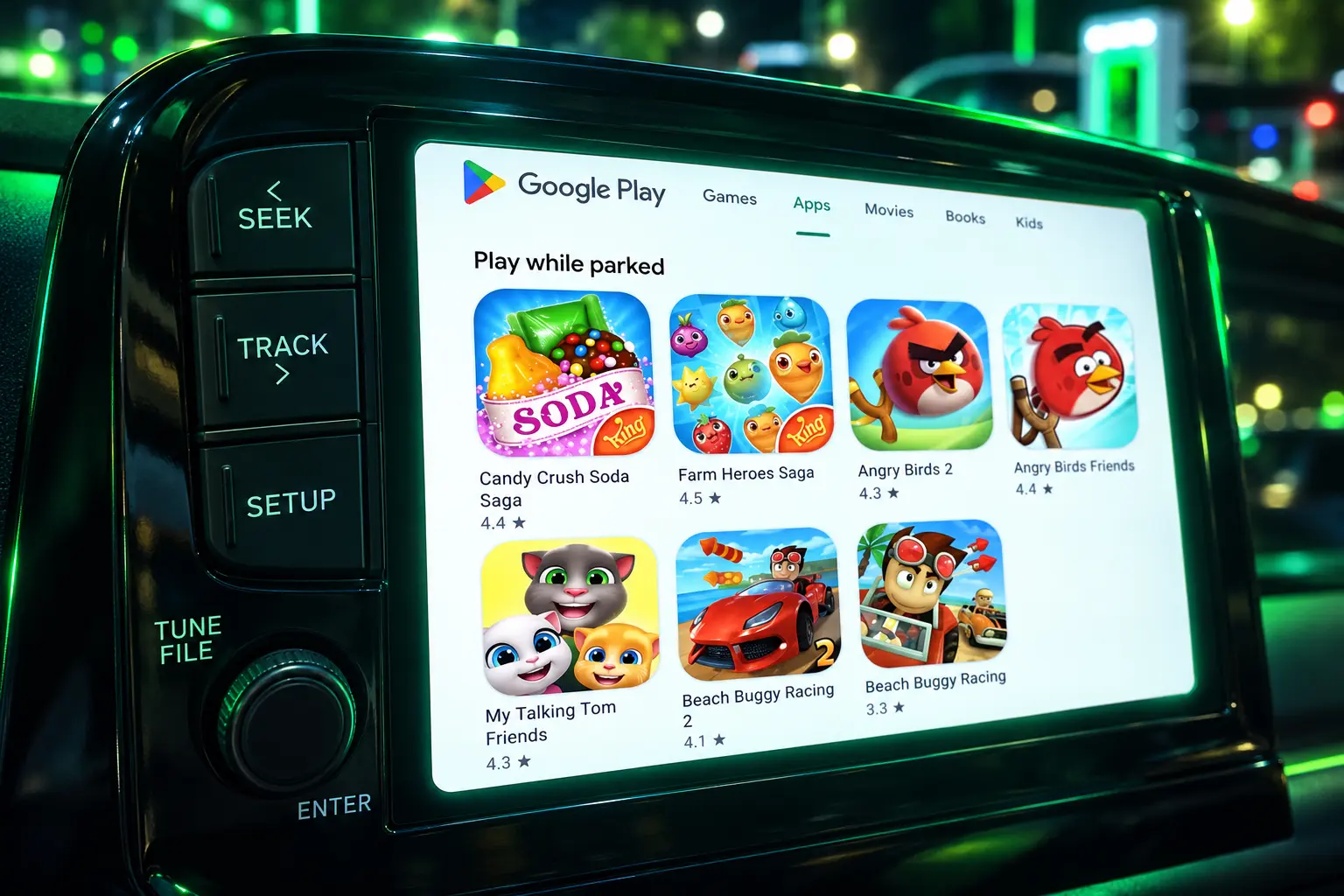
- March 2025: Android Auto 14.1 starts showing parked games on the projected dash. The first set is Angry Birds 2, Beach Buggy Racing, Candy Crush Soda Saga, and Farm Heroes Saga, on phones running Android 15.
- May 22, 2025: Developer docs add Android Auto games and limit publishing to internal and closed testing on both Android Auto and Android Automotive OS.
- May 2025: I/O repeats the same four live titles, keeps the category in beta, and invites studios to apply for production while the gate is still closed.
- March 2026: A Pixel feature drop adds Teacher Approved kids’ games for ages 3 to 12 on parked Android Auto.
- September 14, 2026: Android for Cars docs mark the Games category generally available and add screen-ratio and hardware-spec sections.
- September 21, 2026: Kleinert’s post opens open testing and production tracks on Google Play.
The through-line is how slowly the public shelf moved. The games named at Google I/O in 2025 were Angry Birds 2, Farm Heroes Saga, Candy Crush Soda Saga, and Beach Buggy Racing 2. Hands-on write-ups through 2026 still circled that King and Rovio cluster. Open tracks exist because the invite list did not fill the store by itself.
Why Games Need Android 15
Parked play on Android Auto is a phone feature. The game is installed on the handset, then drawn on the car display. Google’s games guide sets that bar at Android 15 (API 35) and newer. An older phone can run Android Auto for maps and music and still get a blank games row.
Android Auto 14.1 was the Auto app stream that first painted those four titles in March 2025. It is not a substitute for the OS bar. You need both the current Auto build and a phone on Android 15.
The rest of the gate is quality, not versioning. Games must restore as much prior state as they can when you come back from the home screen. They have to take input without freezing or stuttering. On Android Auto they must not sit in a fat pillarbox on a landscape dash. And they have to fail closed when the car moves.
THE PARKED-GAME RULES
| Rule | What Google requires |
|---|---|
| When it runs | Only while parked. The game must not launch or stay usable in motion. |
| Audio in drive | Sound stops when driving starts and cannot be unpaused on the move. |
| State | Relaunch from the home screen should restore the last session as closely as possible. |
| Performance | The game stays responsive. No freeze or stutter during play. |
| Android Auto screens | No heavy pillarboxing on landscape displays. |
| Phone OS (Android Auto) | Android 15 or newer. |
Those driver distraction rules for games are the part studios will actually test. Blocking the picture is the obvious bit. Cutting audio so it cannot resume in Drive is the transition that fails in an emulator if you only check the launch path.
The Phone Projects, the Car Installs
Android Auto and Android Automotive OS share a Play category and split the hardware. Auto is a projection from the phone. Automotive OS is the car’s own computer, with Play on the dash in cars with Google built-in. A title that only opts into Auto never lives in the vehicle after you unplug. A title that ships for Automotive OS stays in the car.
TWO WAYS A GAME REACHES THE DASH
| Platform | Where the game runs | Version bar | Screen targets |
|---|---|---|---|
| Android Auto | On the phone, drawn on the car display | Android 15 and newer | Landscape 16:9, portrait 9:16 |
| Android Automotive OS | Installed in the car | The OS version’s car hardware spec (CDD) | Landscape 4:3, portrait 10:16 |
Google now tells studios to hit common display aspect ratios for cars and to go fully adaptive so the game fills the panel without letterboxing. Auto and Automotive OS do not even share the same “anchor” ratio. A phone-first match-three that looks fine on 16:9 can waste a 4:3 center stack. That is extra layout work for a session that may last as long as a charger handshake.
Car makers have not waited for Play’s open tracks to put something on that glass. Ford’s in-car arcade sports pack already ships shuffleboard, button soccer, and paper football for the cabin, with the phone used as a controller. The OEM is filling the same wait Google just opened to every Play developer.
The Back Seat Was the First Audience
The people asking for this were not, for the most part, drivers who wanted a boss fight at a red light. They were families stuck in a parked cabin, kids facing a screen that already plays maps and podcasts. Google treated that as a product in March 2026, months before production tracks opened for every studio.
Mishaal Rahman, who does community engagement for Android at Google, posted the drop on March 3, 2026. Teacher Approved games for children aged 3 to 12, on Android Auto, only while parked.
🚗 Entertain your kids while parked with Teacher Approved kids’ games
There’s a set of new Teacher Approved games available for Android Auto that’ll keep the family entertained while you’re parked. These games are tailored for children aged 3-12. Check them out! pic.twitter.com/sQLWkP2sfi
— Mishaal Rahman (@MishaalRahman) March 3, 2026
The March set included Disney Coloring World, LetraKid: Writing ABC for Kids, Marvel HQ: Kids Super Hero Fun, Draw a Stickman: EPIC 3, and Kids Games: For Toddlers 3-5. Coloring and letter-tracing are the opposite of a driving game. They are what you hand a child when the car is going nowhere.
THE MARCH 2026 KIDS SET
- Disney Coloring World: A digital coloring book on the dash.
- LetraKid: Writing ABC for Kids: Letter practice aimed at early readers.
- Marvel HQ: Kids Super Hero Fun: A superhero title in the same Teacher Approved row.
- Draw a Stickman: EPIC 3: A drawing adventure scaled for the car panel.
- Kids Games: For Toddlers 3-5: A toddler pack at the bottom of the age band.
That catalog is the tell. Google did not open production tracks to turn highway minutes into raid nights. It opened them after it had already put a coloring book on the center stack. Charge waits still matter. So does a parked SUV full of kids.
What Developers Have to Ship Now
The new work is paperwork and layout as much as code. A game has to declare itself a game in the manifest, opt into the car form factors in Play Console, and pass the parked-app quality bar before it shows up in the car collections. Google also wants the last session waiting when the player comes back, because a charge stop is a bad time to replay a tutorial.
THE PATH TO A LIVE CAR GAME
- Manifest category: Set android:appCategory to game so Play can file it in the car games row.
- Form factor opt-in: Add Android Auto and, if you ship on the car computer, Android Automotive OS in Play Console advanced settings.
- Parked-only: Do not mark activities distractionOptimized. The OS already blocks the UI in motion.
- Audio cut: Stop sound when Drive begins and keep it stopped until Park returns.
- Layout: Fill 16:9 and 9:16 for Auto, and 4:3 and 10:16 for Automotive OS, without a fat empty frame.
- Controller: If you support a pad, declare android.hardware.gamepad as optional so car makers can surface that.
- Checkout on Automotive OS: Play Billing still works, but the buy flow finishes on another device, through the Play app or the website, not on the dash.
That last point is easy to miss if you only test on a phone. In a Google-built-in car, the purchase does not complete on the screen the child is coloring on. Someone has to finish it on a phone or a laptop. Licensing can still check the account on the car. The credit card step leaves the cabin.
None of this makes a hit by itself. It makes a short, fat-fingered, restore-friendly session that dies cleanly when the shifter moves. Studios that already built for big tablets are closest. Studios that need a 60-frame fight and a 20-minute checkpoint are not.
Frequently Asked Questions
Do Android Auto Games Work on Android 14 Phones?
No. Parked game apps on Android Auto need a phone running Android 15, API level 35, or newer. Android Auto 14.1 was the Auto app release that first showed games in March 2025, and it does not replace that phone OS bar. Maps and media can still project from an older handset; the games row will not.
Can a Game Keep Playing Sound After You Drive?
No. Games must stop audio when driving starts and cannot unpause that audio in motion. Video apps can use a separate exception, DD-4, to keep sound going on supported hardware. That exception is not written for games, so a racing title cannot ride along as background music after you leave Park.
How Do In-Car Game Purchases Work?
On Android Automotive OS with Google built-in, Play Billing uses the same hooks as on phones, but the buy flow is finished on another device through the Play app or website. The car can still check a Play license for that user. Android Auto games run on the phone, so those purchases follow the phone’s normal Play checkout rather than the car’s off-device flow.
What Is the Car Ready Mobile Apps Program?
It is an invite-only path, described in February 2025, for adaptive large-screen apps in video, games, and browsers. Google reviews a mobile title and can opt it into cars with Google built-in and Android Auto without a new car-only binary. Developers nominate through an interest form. A rejection does not block a studio from adding car support itself and publishing on the tracks that just opened.
Production tracks are open as of September 21, 2026. The session Google wants is still a parked one, on a 16:9 or 4:3 dash, with the sound cut the moment the car rolls. The next titles have to fit that window.

A CubeSat Will Age Whisky That Never Comes Home

A Charity Quote Cost Shia LaBeouf the FKA twigs NDA

Looker Turned a Model’s Body Into Ad Inventory

Infinity Ward Bets a Paid DMZ Will Stick This Time

Disney Sidesteps a Kimmel Renewal as Failla Cites Losses

How to Get Pre Boarding on Southwest – Skip the Line with These Tricks

False AI Intel Nearly Put US Crews on a Chinese Ship

Tim Cook’s $4.6 Trillion Apple Still Runs on One Phone

Dunes Air Sues Nora Fatehi Over Its Luxury Jet

OpenAI Posts a Navier-Stokes Proof Clay Has Not Touched
-
 TRAVEL3 years ago
How to Get Pre Boarding on Southwest – Skip the Line with These Tricks
-
 NEWS1 month ago
False AI Intel Nearly Put US Crews on a Chinese Ship
-
 BUSINESS2 months ago
Tim Cook’s $4.6 Trillion Apple Still Runs on One Phone
-
 ENTERTAINMENT2 months ago
Dunes Air Sues Nora Fatehi Over Its Luxury Jet
-
 NEWS2 months ago
OpenAI Posts a Navier-Stokes Proof Clay Has Not Touched
-

 LIFESTYLE3 years ago
How Often Do You Have to Change a Monkey’s Diaper? The Truth About Pet Monkeys
-

 NEWS2 months ago
Australia Treats Cloud Software Payments as Taxable Royalties
-

 LIFESTYLE3 years ago
How Long Does It Take for Armpit Hair to Grow? The Stages of Hair Growth and How to Shave It